

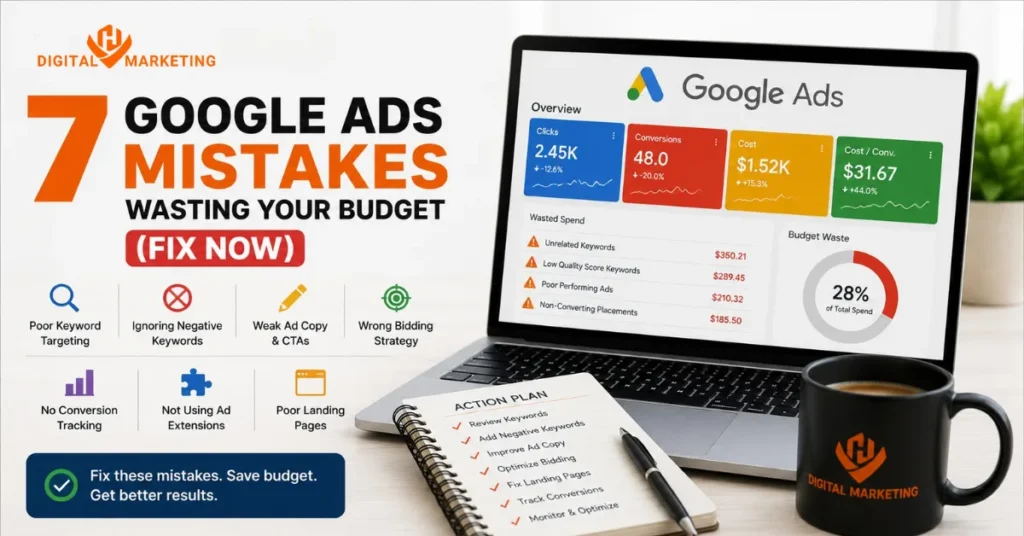
A client walked into our Surat office last year spending ₹60,000 a month on Google Ads. Three leads. That’s it. Three leads for two months straight, and two of those turned out to be competitors clicking around out of curiosity.
That’s not a Google Ads problem. That’s a Google Ads mistakes problem. And it’s wasting budget in ways most business owners never actually see, because the dashboard still shows clicks, impressions, and a rising spend number that looks like “activity.” Activity isn’t revenue.
I’ve audited close to sixty Google Ads accounts over the years at HV Digital Marketing, and honestly, the same handful of mistakes show up again and again. Not obscure ones. The obvious ones nobody fixes because the account “looks fine” from the outside.
The Short Version
Most Google Ads mistakes wasting budget come down to five things: no negative keywords, clicks landing on the homepage instead of a dedicated page, a Quality Score nobody’s watching, unused ad extensions, and an account that hasn’t been audited in months. Fix those five and most accounts recover 20 to 40% of wasted spend within 30 days.
Here’s the reader problem before we get into fixes. You’re checking Google Ads every few days, the spend keeps climbing, and the phone isn’t ringing any more than it was before you started. Or worse, it’s ringing, but with people who were never going to buy. You didn’t do anything “wrong” in the traditional sense. You just never learned where the leaks are, because nobody showed you.
1.Running Broad Match Keywords Without Negative Keywords
This is the single most expensive Google Ads mistake we see, full stop. Broad match sounds harmless. It’s not. Broad match without a negative keyword list is basically telling Google “spend my money on anything remotely related to this word,” and Google will absolutely do that.
What Broad Match Without Negatives Actually Costs You
Say you sell custom kitchen cabinets and you’re bidding on “kitchen cabinets.” Without negatives, that ad can show for “kitchen cabinets jobs,” “kitchen cabinets DIY,” “kitchen cabinets clipart,” and “cheap kitchen cabinets” when you’re a premium brand. Every one of those clicks costs you the same as a genuine buyer’s click.
We pulled the search term report for one Surat-based real estate client and found 31% of their spend that month went to searches containing “rent,” “job,” and “salary.” None of those searchers wanted to buy a flat. That’s close to a third of the budget gone before a single qualified lead even saw the ad.
The Fix
Pull your Search Terms report weekly, not monthly. Add anything irrelevant straight to a negative keyword list at the campaign or account level. Do this consistently and most accounts see a meaningful drop in wasted spend within two to three weeks.
2.Sending Clicks to Your Homepage Instead of a Landing Page
Here’s a hard truth. If your ad promises “Free Google Ads Audit” and the click lands on your generic homepage with six services, a slider, and a contact form buried in the footer, you’ve already lost that visitor. They came for one thing. You gave them everything, which functionally means you gave them nothing.
Why a Landing Page Beats a Homepage Every Time
A dedicated landing page that matches the ad’s exact promise converts at a completely different rate than a homepage. And here’s the thing: this isn’t a “nice to have.” Google itself factors landing page relevance into your Quality Score, so a mismatched destination costs you twice. Once on lost conversions, once on inflated cost-per-click.
I’ll admit something most agencies won’t. Building a proper landing page takes more upfront work than just pointing ads at the homepage, and it’s tempting to skip it when a client wants ads live “this week.” We’ve made that shortcut before. It never ends well. The campaigns that skipped a dedicated page always cost more per lead than the ones that didn’t.
The Fix
One offer, one headline, one clear call to action, one page. Match the page copy word-for-word to what the ad promised. Skip this step and you’re quietly funding one of the most common Google Ads mistakes wasting budget on autopilot.
3.Ignoring Quality Score and Its Impact on Cost
Quality Score is Google’s 1-10 rating of how relevant your keyword, ad, and landing page are to each other. Most business owners have never even looked at this number. That’s a mistake, because Quality Score directly multiplies or divides what you pay per click.
How Quality Score Multiplies Your Cost Per Click
Google Ads is a Google Ads mistake trap for anyone who treats Quality Score as background noise. A Quality Score of 3 can mean paying nearly double what a competitor with a Quality Score of 8 pays for the exact same auction position. Same keyword. Same industry. Wildly different cost, purely because one account is more relevant.
According to WordStream’s 2026 Google Ads benchmark report, the average Google Ads click-through rate for Search now falls somewhere between roughly 3.5% and 6%, and low CTR tends to correlate directly with higher Quality Score-driven costs. Translation: if your CTR is below that range, you’re likely paying a Quality Score penalty right now without knowing it.
The Fix
Check the Quality Score column under Keywords. Anything below 5 needs tighter ad copy, a more relevant landing page, or removal from the campaign entirely.
4.Not Using Ad Extensions (Assets) Properly
Ad extensions, which Google now calls “assets,” are free real estate Google hands you and most accounts leave half of them turned off. Each one makes your ad bigger, more informative, and more clickable, at no extra cost per impression.
Which Extensions Actually Move the Needle
Sitelinks and Callouts
Sitelinks push extra links to specific pages, like pricing or a contact form, right under your main ad. Callouts add short trust phrases, “Free Audit,” “24-Hour Response,” without taking up a click. Both make the ad physically bigger on the results page.
Call and Location Extensions
For service businesses especially, a tappable phone number or a map pin next to your ad removes a whole step for the searcher. Fewer steps between seeing the ad and contacting you means fewer people dropping off in between.
Skipping these isn’t neutral. It’s an active Google Ads mistake wasting budget, because a bigger ad with more assets pushes competitor ads further down the page and typically improves click-through rate, which then feeds back into a better Quality Score. It’s one of the few genuinely free wins left in the platform.
We added four sitelink extensions and a call extension to a home services client’s campaign in under fifteen minutes. Click-through rate went up. Cost per click came down within the same week, purely from that one change.
The Fix
Add all relevant asset types available for your campaign goal. Update sitelinks quarterly so they don’t go stale. It costs nothing and it’s one of the easiest Google Ads mistakes to fix in a single afternoon.
5.How to Audit Your Google Ads Account in 30 Minutes
Most people think auditing a Google Ads account requires an agency, a spreadsheet template, and half a day. It doesn’t. Here’s the process we actually run with clients when we start fresh.
The 5-Step Audit Process
- Pull the Search Terms report for the last 30 days and flag anything irrelevant.
- Check Quality Score on every keyword and flag anything under 5.
- Confirm conversion tracking is firing correctly on the actual goal, not just page views.
- Check which ads are running broad match with zero negative keywords attached.
- Review landing pages against ad copy for a direct match. The result is a short, specific list of leaks, not a vague “your account needs work.”
Why Conversion Tracking Gets Missed Most Often
That last point matters more than people expect. Conversion tracking that’s technically “installed” but tracking the wrong event is one of the quieter Google Ads mistakes wasting budget, because the account looks like it’s optimizing toward leads when it’s actually optimizing toward form-page views that never turn into a phone call.
6.What Actually Happened When We Audited a Client’s Account
Back in early 2024, a Surat-based home renovation client came to us convinced their Google Ads simply “didn’t work” for their industry. Spend was steady. Leads were almost zero. Within the first ten minutes of pulling the search terms report, the problem was obvious: broad match keywords with no negatives, sending roughly a quarter of the budget to searches for renovation jobs and DIY tutorials.
We rebuilt the negative keyword list, moved the top three keywords to phrase match, and pointed the ads to a new landing page built around one offer instead of the whole service menu. Cost per lead dropped by more than half within the first month. Not because we found some secret targeting trick. Because we fixed five obvious leaks nobody had looked at in over a year.
That’s usually how it goes. It’s rarely one dramatic fix. It’s five small ones, stacked.
7.Real Numbers Worth Knowing
A few data points worth having in front of you before your next budget review.
Conversion Rate Benchmarks
LocaliQ’s 2026 search advertising benchmarks put the average Google Ads conversion rate across industries at around 8%, calculated as leads divided by clicks, so if your account is converting well below that, something upstream, usually the landing page or the keyword match type, needs attention rather than the ad copy itself.
AI Overviews Are Changing the Math
Search Engine Land’s research on AI Overviews also found that paid click-through rate can drop noticeably on queries where an AI Overview now appears, which is one more reason ad extensions and tightly matched landing pages matter more in 2026 than they did two years ago.
We covered the groundwork for this in our guide to SEO for small businesses in India, since a lot of these same relevance principles carry over from paid to organic. And if budget is genuinely tight, our breakdown on small business SEO is worth reading before you increase ad spend further.
Comparison: What Changes When You Fix These Google Ads Mistakes
| Mistake Fixed | Typical Impact | Time to See Results |
|---|---|---|
| Adding negative keywords | 15-30% less wasted spend | 1-2 weeks |
| Dedicated landing page | Higher conversion rate on same clicks | 2-4 weeks |
| Improving Quality Score | Lower cost per click | 3-4 weeks |
| Adding ad extensions | Higher CTR, more clicks at same spend | Same week |
| Monthly account audit | Fewer leaks compounding over time | Ongoing |
FAQs
Q: Why are my Google Ads not converting?
A: Usually it’s a mismatch, not the platform. The ad promises one thing, the landing page delivers something else, or the offer isn’t clear within the first five seconds. Check conversion tracking first. In a lot of accounts we audit, it’s tracking the wrong event entirely.
Q: What is a good CTR for Google Ads?
A: The cross-industry average Search CTR in 2026 sits somewhere around 3.5% to 6%, so anything above 5% for a Search campaign is generally solid. Below 3%, you’re likely paying a Quality Score penalty on every click.
Q: How do I stop wasting money on bad clicks?
A: Add negative keywords weekly, not monthly. That single habit prevents more wasted spend than almost any other single change you can make to an account.
Q: What is Quality Score and why does it matter?
A: It’s Google’s 1 to 10 rating of how relevant your keyword, ad, and landing page are to each other, and it directly affects what you pay per click. A low score can nearly double your cost for the same ad position.
Q: How much should a small business spend on Google Ads?
A: There’s no universal number. Start with an amount you can commit to for at least 60-90 days, since that’s roughly how long it takes to gather enough data to optimize properly. Cutting spend too early is one of the quieter Google Ads mistakes wasting budget long-term.
Q: How often should I check my Google Ads account?
A: Weekly for search terms and spend pacing. Monthly for a fuller audit covering Quality Score, ad extensions, and landing page performance. Quarterly for a complete strategy review.
Q: Is Google Ads still worth it in 2026?
A: Yes, for most businesses, though the margin for error is smaller now. With AI Overviews changing click behavior, sloppy accounts waste more budget than they used to. Well-run accounts still perform reliably.
Q: Google Ads vs Meta Ads, which wastes less budget?
A: Depends entirely on intent. Google Ads captures people actively searching, which usually means higher intent but higher cost per click. Meta Ads reaches people who weren’t looking yet, so it’s cheaper per click but needs stronger creative to convert. Neither wastes less budget on its own; poor targeting does.
Stop Burning Your Ad Budget
If even two of these five Google Ads mistakes sound familiar, your account is probably wasting more budget than it needs to. Book a free Google Ads audit with HV Digital Marketing and get a specific list of exactly where the leaks are, not a generic “your account needs work” report.
For a broader look at what’s holding local businesses back online, our guide to the best digital marketing agency approach in Surat covers how SEO and paid ads work together. And if you’d rather start with the full-service picture, our Google Ads management services page breaks down exactly how we run these audits and rebuilds for clients.
Bonus: Ask for our free Google Ads audit checklist when you book your call, the same one we use internally before touching any client’s account.
“`html “`
Founder of Digi Segment and HV Digital Marketing
SEO Strategist & Digital Marketing Expert
Hardik Vaghani is a digital marketing professional and SEO strategist based in Surat, Gujarat, India. He is the founder of Digi Segment, a content and insights platform covering SEO, digital marketing, AI tools, and online growth strategies, and the founder of HV Digital Marketing, a results-focused digital marketing agency helping local and service-based businesses rank on Google and generate consistent leads.
With hands-on experience in Search Engine Optimisation, Technical SEO, Google Ads, Meta Ads, and Content Strategy, Hardik has helped businesses across industries including e-commerce, real estate, healthcare, home improvement, and solar companies improve their organic visibility, local search rankings, and lead generation through ethical, white-hat strategies.
He specialises in Core Web Vitals optimisation, on-page SEO, keyword research aligned with search intent, and building scalable content frameworks that rank. At Digi Segment, Hardik shares practical, experience-backed insights, case studies, and step-by-step guides to help marketers, entrepreneurs, and small businesses grow online.
When he is not optimising websites, Hardik is building digital tools, writing SEO-focused content, and working with his agency clients to turn Google visibility into measurable business growth.
Expertise: SEO | Technical SEO | Google Ads | Meta Ads | Content Strategy | Core Web Vitals | WordPress | Digital Marketing | Lead Generation | Local SEO